Model Context Catalog
MCC is an MCP server that acts as a permission-controlled catalog of tools. It exposes pre-defined Python functions and shell commands to Claude and other LLM clients through a unified search / execute interface, with authentication and group based access controls built in.
MCC is written in Python FastMCP and uses Elastic or OpenSearch for a data store and fastembed for semantic search
How it works
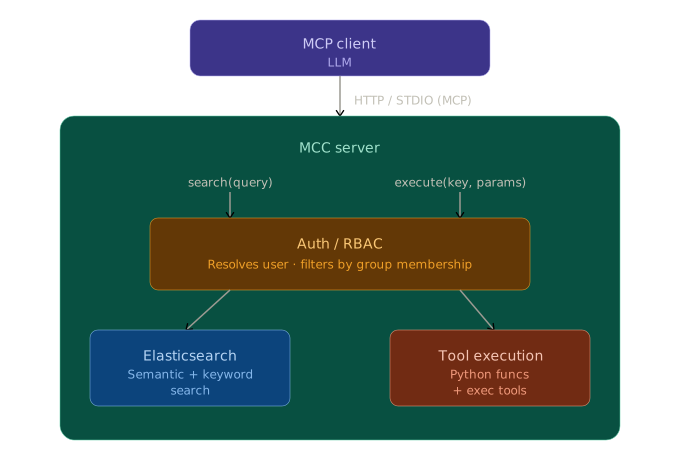
The MCP client uses just two primary tools:
search(query)— finds tools by natural language (hybrid keyword + semantic search), returns signatures with relevance scoresexecute(key, params)— runs a tool by key, validates params, checks permissions
Why only two tools?
Most MCP servers expose every capability as a separate named tool. MCC takes the opposite approach: the catalog itself is the interface, and the LLM navigates it dynamically.
The problem with many tools: LLM context windows fill up with tool definitions. With 30+ tools loaded, a significant portion of every request is spent just describing what's available — before any actual work happens. Tool selection also degrades as the list grows; models struggle to choose well from large flat lists.
The catalog approach: search and execute give the model a two-step interface to an arbitrarily large collection of tools. The model asks "what can help me here?" before acting, rather than scanning a fixed manifest. You can register hundreds of tools without bloating the context — only the ones the model actually finds and uses consume tokens.
This also makes the catalog self-documenting. The model learns about tools on demand, in the context where it needs them, rather than loading all descriptions upfront.
Key features
- Two tool types: point at any Python callable (
fn:) which runs in the server's interpreter or wrap any shell command (exec:) which can run any interpreter - Tool spec templates: can interpolate env vars
${MYVAR}at load time and then{{ param | quote }}at execute time for safe shell interpolation, with conditionals and list expansion - Semantic and keyword search over your tool catalog and gives ranked results for the LLM to pick from. powered by Elastic or OpenSearch and FastEmbed
- Group-based access control tools specs define
groupsand users are stored in the configured search backend (Elasticsearch or OpenSearch). users can be granted tool access viagroupsor specifictools - Auth backends: GitHub OAuth, Google, Azure, and more — or dev mode (
dev-admin) - Resource limits at the tool level to limit the cpu/mem/etc for any tool's subprocess.
- Contrib tools: optional built-ins for HTTP, filesystem, shell, text processing, and more
- Hot reload catalog tool defs without restarting the server
- MCP resources and prompts for catalog browsing and guided workflows
Project inspiration How to build an enterprise-grade MCP registry